Posts

Showing posts with the label Configuration Manager 2007

How to use a collection variable to prompt for a computer name during an OS Deployment Task Sequence in System Center Configuration Manager 2007

Microsoft published below KB article which describe the process to prompt for a computer name during an OS Deployment Task Sequence in Configuration Manager 2007. http://support.microsoft.com/default.aspx?scid=kb;EN-US;2026268

SCCM WSUS sync error – Sync Failed – WSUS server not configured

Consider the following scenario The WSUS is installed on SCCM central site server. The correct port is configured in Software Update Point setting. No proxy server is in used.   I was getting following error in WSysncmgr.log file when initiating synchronization from Configuration Manager console. Sync failed: WSUS server not configured. Source: CWSyncMgr::DoSync STATMSG: ID=6703 SEV=E LEV=M SOURCE="SMS Server" COMP="SMS_WSUS_SYNC_MANAGER" SYS=SERVER1 SITE=BNG PID=1728 TID=3408 GMTDATE=Sat Apr 03 18:28:48.292 2010 ISTR0="CWSyncMgr::DoSync" ISTR1="WSUS server not configured" ISTR2="" ISTR3="" ISTR4="" ISTR5="" ISTR6="" ISTR7="" ISTR8="" ISTR9="" NUMATTRS=0 I have gone through lots of articles but nothing worked for me. I have also verified the configurations as described in the TechNet article. Everything was fine. http://technet.microsoft.com/en-us/library/bb73...

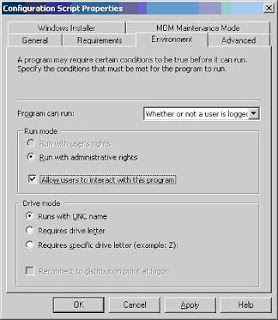
SCCM 2007 - Displaying a message to user during application / script deployment

Image
As per the standard practice any message should not be displayed during software deployment but there might be some cases when you can’t follow this rule. Recently I was deploying a VBScript through SCCM software deployment. The script was supposed to display a message box to the user, before it can proceed with upgrade, if particular application was found running. The issue was that message box was not visible and due to that user can’t provide the input. Hence, the deployment got stuck forever. The issue was occurring because “ Allow users to interact with this program ” option was not selected in “Environment” tab. Select “ Allow users to interact with this program ” option in “Environment” tab. If you do not select this option, the program run in an administrative context and no user interface is displayed to the user. This is the default setting. If you select “ Allow users to interact with this program ”, the user interface for the program is vis...