Posts

Showing posts with the label Software Distribution

SCCM Software Distribution Troubleshooting

Image
1.    Content Monitoring and Validation from Console The below article provide details of content monitoring and validation from console. https://blogs.technet.microsoft.com/inside_osd/2011/04/06/configuration-manager-2012-content-monitoring-and-validation/ 2.    Reports SCCM reports should be the first thing to check the software deployment status. By looking into the report you can determine the scope of failure such as large scale failure, location based failure or client specific issues. A large scale failure may be caused by an issue with package or programe while issue can be related with specific client if deployment failure rate is low and limited to few clients. There are multiple reports available for each category.  All Software Distribution reports can be found in below folders under Monitoring > Reporting > reports. ·          Software Distribution – Collections · ...
SCCM Deployment - Generating MIF file using VBScript

Image
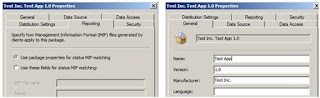
The below VBScript will create the package installation status MIF file. The problem with the script initiated deployment is that it returns the success status even if the action performed by the script failed.   I have found this script on appdeploy website. The original script is located at http://www.appdeploy.com/messageboards/tm.asp?m=52414     Script Usage: SMSWriteStatusMIF “MIF File Name”, “Manufacturer”, “Product Name”, “Version”, “Description”,bSuccess   MIF File Name   : Name of the status MIF file. Manufacturer      : The application vendor Product Name     : Application name Version               : Application version Description         : The error description bSuccess             : True / False Script   Sub SMS...

SCCM 2007 - Displaying a message to user during application / script deployment

Image
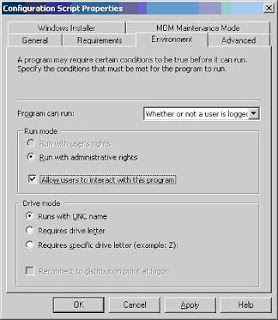
As per the standard practice any message should not be displayed during software deployment but there might be some cases when you can’t follow this rule. Recently I was deploying a VBScript through SCCM software deployment. The script was supposed to display a message box to the user, before it can proceed with upgrade, if particular application was found running. The issue was that message box was not visible and due to that user can’t provide the input. Hence, the deployment got stuck forever. The issue was occurring because “ Allow users to interact with this program ” option was not selected in “Environment” tab. Select “ Allow users to interact with this program ” option in “Environment” tab. If you do not select this option, the program run in an administrative context and no user interface is displayed to the user. This is the default setting. If you select “ Allow users to interact with this program ”, the user interface for the program is vis...