Posts

Showing posts with the label Computer Management

Powershell Script: Validate if Computer account exists in Active Directory

The below script will let you quickly validate if given computers are exists in Active Directory. You have to keep both script and Computer.txt in same location. Add the computers name in text file separated by new line. The result will be saved in Output.csv file in script folder. $File = "$PSScriptRoot\Computers.txt"  $LogFile = "$PSScriptRoot\Output.csv"    # Function to WriteLog File  Function WriteLog($Msg)  {      $Text = $Msg      Add-Content -Path $LogFile  $text       Write-Host $Text  }      $ComputerList = Get-Content -Path $File  $TotalRecord = ($ComputerList).Count  foreach ($computer in $ComputerList){      $error.clear()      try{$ADComputer = Get-ADComputer $computer -Properties *}      catch{ WriteLog "$computer,Does not Exists in AD"}    ...
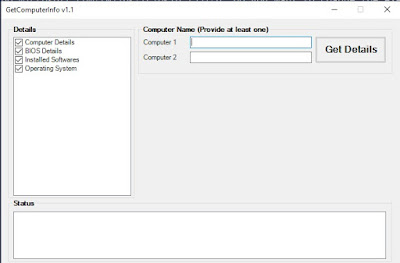
Powershell Script to get computer hardware and software details

Image
This Powershell script will collect Hardware & Software details from provided remote computers. Key points: Collect the data for two computers. You need to provide at least one computer name. The result will be saved in an Excel file in script directory. You can quickly compare the data for two computers which will be helpful in troubleshooting client issues. Download Instructions: Click he re to open the script in browser Click on Download button Remove .txt extension from file name How to Run: Right click on script and select "Run with Powershell" Note: More features will be added in next versions.

Powershell - Get system uptime

$Computer = Read-Host   "Input Computer Name " $LastBoot = (Get-WmiObject -Class Win32_OperatingSystem -ComputerName $Computer ).LastBootUpTime $uptime = (Get-Date) - [System.Management.ManagementDateTimeconverter]::ToDateTime($LastBoot) Write-Host  "$Computer uptime is:"     [$uptime]   [dd:hh:mm:ss.ms]