Posts

DHCP Log Parser

I am sharing the script which I had created long time back for parsing DHCP Logs. This script will pull out computer name and IP address details for each log files placed in "DHCPLogs" folder and save the result in .CSV file. Steps: 1. Copy the script in notepad and save as "DHCPLogParser.vbs" or whatever you like. 2. Create a folder named "DHCPLogs" in script directory. 3. Copy all DHCP Logs with folders / subfolders in "DHCPLogs" folder 4. Run the script 5. Result will be saved in DHCPLog-Parsed.csv file. Dim objCurrentFolder Set objFso = CreateObject("Scripting.FileSystemObject") Set objResult = objFso.CreateTextFile("DHCPLog-Parsed.csv") CheckFolder objFso.GetFolder ("DHCPLogs") WScript.Echo "Done !!!" '#### Sub CheckFolder Sub CheckFolder(objCurrentFolder) For Each objFile In objCurrentFolder.Files 'WScript.Echo "Processing " & objFile.Path &...
SCCM Deployment - Generating MIF file using VBScript

Image
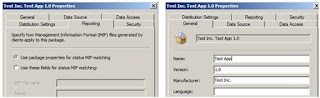
The below VBScript will create the package installation status MIF file. The problem with the script initiated deployment is that it returns the success status even if the action performed by the script failed.   I have found this script on appdeploy website. The original script is located at http://www.appdeploy.com/messageboards/tm.asp?m=52414     Script Usage: SMSWriteStatusMIF “MIF File Name”, “Manufacturer”, “Product Name”, “Version”, “Description”,bSuccess   MIF File Name   : Name of the status MIF file. Manufacturer      : The application vendor Product Name     : Application name Version               : Application version Description         : The error description bSuccess             : True / False Script   Sub SMS...

Deployment Tools Technical Reference

There are several tools available from Microsoft to configure and deploy Windows operating system.The Technet Document Library provide descriptive technical information about these tools . The below link cover the following tools. Windows Setup Technical Reference ImageX Oobe DISM Sysprep Windows PE Windows Recovery Windows System Image Manager Please see the below technet article for more details.   http://technet.microsoft.com/en-us/library/dd744270(WS.10).aspx  

How to use a collection variable to prompt for a computer name during an OS Deployment Task Sequence in System Center Configuration Manager 2007

Microsoft published below KB article which describe the process to prompt for a computer name during an OS Deployment Task Sequence in Configuration Manager 2007. http://support.microsoft.com/default.aspx?scid=kb;EN-US;2026268

SCCM WSUS sync error – Sync Failed – WSUS server not configured

Consider the following scenario The WSUS is installed on SCCM central site server. The correct port is configured in Software Update Point setting. No proxy server is in used.   I was getting following error in WSysncmgr.log file when initiating synchronization from Configuration Manager console. Sync failed: WSUS server not configured. Source: CWSyncMgr::DoSync STATMSG: ID=6703 SEV=E LEV=M SOURCE="SMS Server" COMP="SMS_WSUS_SYNC_MANAGER" SYS=SERVER1 SITE=BNG PID=1728 TID=3408 GMTDATE=Sat Apr 03 18:28:48.292 2010 ISTR0="CWSyncMgr::DoSync" ISTR1="WSUS server not configured" ISTR2="" ISTR3="" ISTR4="" ISTR5="" ISTR6="" ISTR7="" ISTR8="" ISTR9="" NUMATTRS=0 I have gone through lots of articles but nothing worked for me. I have also verified the configurations as described in the TechNet article. Everything was fine. http://technet.microsoft.com/en-us/library/bb73...

SCCM 2007 - Displaying a message to user during application / script deployment

Image
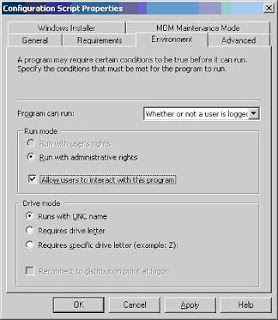
As per the standard practice any message should not be displayed during software deployment but there might be some cases when you can’t follow this rule. Recently I was deploying a VBScript through SCCM software deployment. The script was supposed to display a message box to the user, before it can proceed with upgrade, if particular application was found running. The issue was that message box was not visible and due to that user can’t provide the input. Hence, the deployment got stuck forever. The issue was occurring because “ Allow users to interact with this program ” option was not selected in “Environment” tab. Select “ Allow users to interact with this program ” option in “Environment” tab. If you do not select this option, the program run in an administrative context and no user interface is displayed to the user. This is the default setting. If you select “ Allow users to interact with this program ”, the user interface for the program is vis...

Windows XP SP2 mini setup wizard hang during the plug and play driver installation

Issue: You have created master image of Windows XP SP2 with all the drivers for the other model in the C:\Drivers and added the drivers path in sysprep.inf. The cloned machine may hang during the mini setup wizard. Resolution: To determine the issue boot the machine from WinPE disk and view the setupapi.log file. If the Windows XP mini setup hange during the installation of display drivers then following hot fix should resolve the issue. http://support.microsoft.com/kb/883667 http://support.microsoft.com/kb/910678