Posts

Powershell Script to get computer hardware and software details
Image
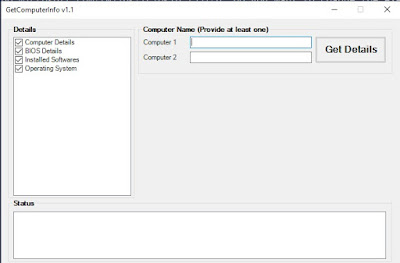
This Powershell script will collect Hardware & Software details from provided remote computers. Key points: Collect the data for two computers. You need to provide at least one computer name. The result will be saved in an Excel file in script directory. You can quickly compare the data for two computers which will be helpful in troubleshooting client issues. Download Instructions: Click he re to open the script in browser Click on Download button Remove .txt extension from file name How to Run: Right click on script and select "Run with Powershell" Note: More features will be added in next versions.

Basic Excel Functions you should know to make your work life easier

Image
As an IT Professional you may have to deal with lots of data every day. I have seen many experienced IT admins spending quite lots of time on the activities which can be quickly performed in Excel if you know few basic Excel formulas. I will explain most commonly used Excel functions here.  Let's start with the String Functions. String Functions: Microsoft Excel offers many functions to manipulate string data. 1. LEFT() LEFT Function allows you to extract the leftmost characters from a string. Syntax :    =LEFT(Text,Num_Chars) The Text  parameter refers to the string you want to manipulate The Num_Chars  parameter refers to the number of characters from left side of string you want to extract. Example: In the below example, we have extracted first 4 characters from left. 2. RIGHT() RIGHT Function allows you to extract the rightmost characters from a string. Syntax  :    =RIGHT(Text,Num_Chars) The  Text ...

Understanding SCCM SQL Views

Image
The Configuration Manager 2012 / Current Branch come with many built in reports which are sufficient for day to day requirements. However, you still have to deal with SQL query to pull custom details directly from SCCM database based on requirement. As an SCCM administrator you must have good understanding of SQL query in order order to pull these information from SCCM database directly. One of the key requirement here is to have understanding of SCCM DB schema. Once you know which information are stored in which SQL view, you can easily write a SQL query to pull out information.  Know SCCM SQL Views: The SCCM SQL View   v_SchemaViews contain the details of all views.  You can use below SQL query to get a list of all views. Select * from v_SchemaViews Since, SCCM creates one separate view for each collection, the list will be quite long. You can filter the result by excluding Collection views from query. Select * from v_SchemaViews where Type <...

Windows Administrator Basics: Managing Windows Services from Powershell

Image
This is the third article of  'Windows Administrator Basics : Windows Services" series. In this series we will learn to manage Windows services from Powershell. If you have not read previous articles then follow below links to navigate through them. Part1: Windows Administrator Basics: Windows Services Part2: Windows Administrator Basics: Managing Windows services from command line Get status of a service using Get-Service cmdlets The Get-Service cmdlets allow you to list services on local computer. Examples :  List all services on the computer PowerShell Copy PS C:\> Get-Service Status   Name               DisplayName                            ------   ----               -----------                            Running...

Windows Administrator Basics: Managing Services from Command Line

Image
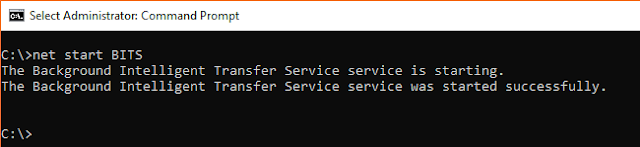
Managing Windows services from command line Part1: Windows Administrator Basics: Windows Services Part3: Windows Administrator Basics: Managing Windows services from Powershell Net Command: You can use NET START and NET STOP command to start and stop Windows service. Using Net command to start a Windows Service NET START   < ServiceName > Using Net command to stop a Windows Service NET STOP < Service Name > SC (Service Control) Command : SC.exe is a powerful command line tool to manage Windows Services. This can be used to Query, Start,Stop,Create or Delete a Windows service. This tool can manage the services on remote computer as well. In this article, we are going to explore Query , start and stop options only. Query Service status of specific service on Local machine SC QUERY < Service Name > Query Service status of specific service on Remote machine SC < \\Computer Name > QUERY < Service Name > Q...

Windows Administrator Basics: Windows Services

Image
What is Windows Services A Windows Service is a computer program that operates in the background. A service don’t have a user interface. They are intended to provide core operating system features such as Event logging, printing or error reporting. Some applications install their own services. Antivirus applications are one of such example. They install different services to enable real time monitoring of your system. Services Console Services console provide an interface to view and manage services. The Services console can be launched in different way. However the easiest way to launch services console is to type "Services" in Windows 10 Search Box. You can now see 'Services - Desktop App' in the list. Just click on Services icon to open Services console.  The Services Console will be opened. You can view, start, stop and configure Windows services from Services Console. To see the description of a service, click on the service and descri...

Now Available: Update 1802 for System Center Configuration Manager

https://cloudblogs.microsoft.com/enterprisemobility/2018/03/22/now-available-update-1802-for-system-center-configuration-manager/